Direct Thermal Print Quality

For distributors and procurement teams buying direct thermal labels in volume, faint or inconsistent printing is more than a printer troubleshooting issue. If an approved sample prints correctly but a later roll or production batch does not, the difference can become a supplier-qualification and batch-acceptance issue.
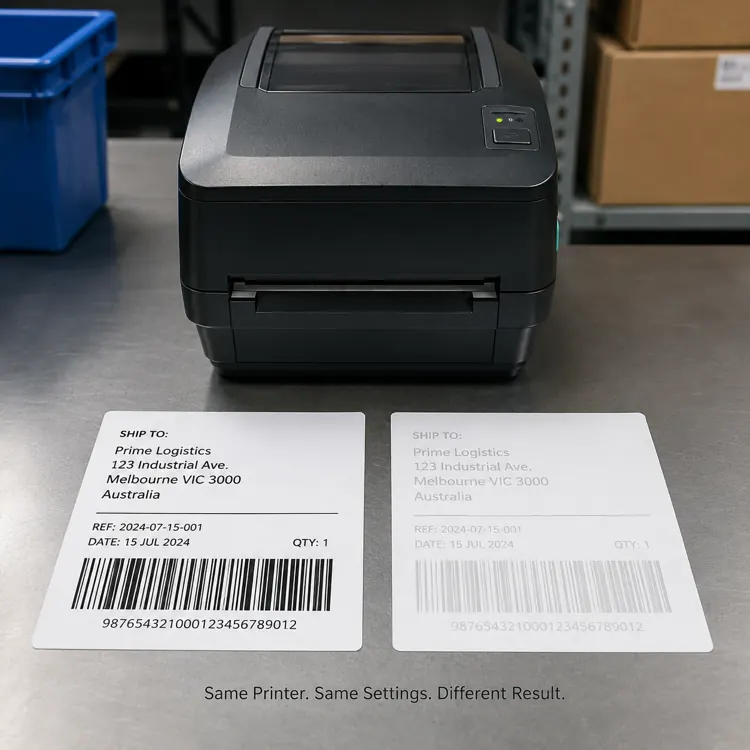
Direct thermal label print comparison showing dark versus faint barcode under identical printer settings.

Direct Thermal Print Quality Problems: Material, Batch or Printer?

Direct thermal print quality depends on a combination of thermal coating sensitivity, print speed, printhead condition, printhead pressure and media consistency. The purchasing task is therefore to separate printer-related variables from material and batch-related variables before accepting or rejecting a production lot.

1. Start With a Controlled A/B Test Before Blaming the Printer or Batch

Use a controlled A/B comparison.

Take the approved label and the new label. Print both using the same printer, speed, darkness, barcode file and operating conditions. Then compare print density and scanning performance.

If the approved material prints normally while the new material remains consistently lighter, media sensitivity or material consistency becomes a much stronger suspect.

If both materials print poorly, investigate the printer, printhead or operating settings first.

2. Thermal Coating Sensitivity: A Material Variable Buyers Should Compare

Direct thermal paper does not contain ink. The image is created when heat from the printhead activates the thermal coating on the label surface. Different materials can therefore require different amounts of energy to reach the same optical density.
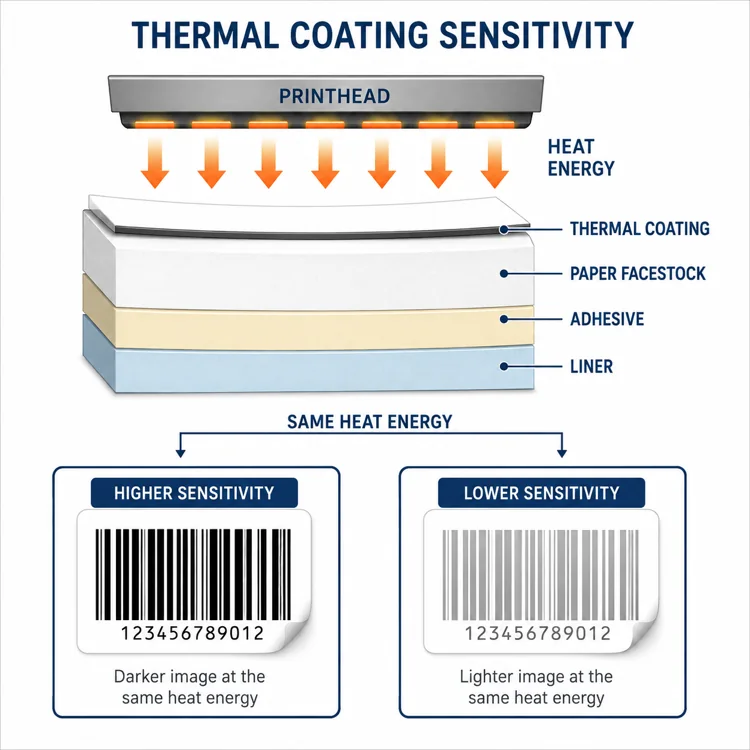
Technical diagram illustrating printhead heat transfer across thermal coating, paper facestock, adhesive, and liner layers.

A label with higher thermal sensitivity can generally develop a dark image using less energy or at a higher printing speed. A less sensitive material may appear pale under exactly the same printer settings.

Buyer question: If an approved roll prints dark and a new production roll prints light on the same printer, is the variable really the printer—or the thermal response of the material or batch?

3. Print Speed Can Expose Material Differences

A thermal printhead has only a limited amount of time to transfer heat into the coating. As print speed increases, that contact time decreases.

This explains a common warehouse situation: a label prints perfectly during a slow test run but becomes noticeably lighter when the production line operates at normal speed.

Increasing darkness may compensate for this—but it should not automatically be the first or only solution.

4. Why Increasing Darkness Is Not a Supplier-Quality Test

When operators see pale printing, the natural reaction is to increase print darkness. That can work, but excessive heat can cause barcode bars to spread into the spaces between them.

The barcode may look darker and stronger to the human eye while actually becoming harder for a scanner to interpret correctly.

The objective should be: use the lowest energy level that produces stable contrast and reliable scanning.

5. Use the Defect Pattern to Separate Printer and Material Problems

The pattern of the defect can tell you a lot.

  • Entire label is light: check media sensitivity, print speed, darkness setting, printhead cleanliness and media compatibility.
  • One side is lighter: investigate uneven printhead pressure or media loading rather than assuming a coating issue.
  • Narrow lines or areas are missing: check the printhead for contamination or damaged heating elements.
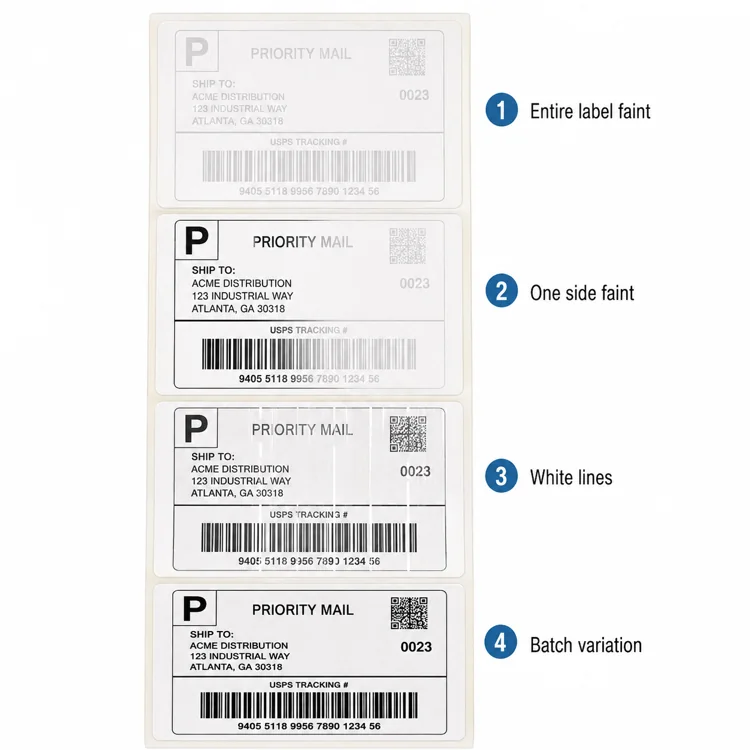
Guide to four thermal printing issues: entire label faint, one side faint, white lines, and batch variation.

6. Rule Out Printhead Condition Before Rejecting a Batch

Dust, adhesive residue or paper contamination on the printhead can act as an insulating layer between the heating elements and the thermal coating.

Less energy reaches the media, which can produce pale areas, white lines or inconsistent print density.

If cleaning restores the original print density, replacing the labels would not have solved the real problem.
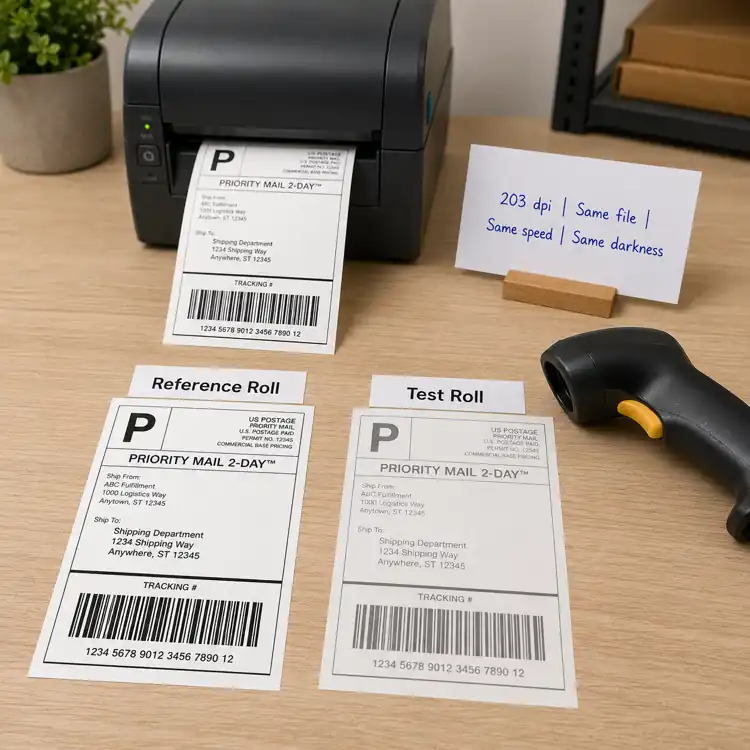
Benchmarking reference roll against test roll with a desktop thermal printer and barcode scanner.

7. Why Sample Approval Is Not Enough for Bulk Orders

A good sample does not automatically guarantee identical production performance.

Small differences in machine settings, pressure, substrate properties, ambient humidity or temperature can change barcode results between print runs. For label buyers, the same principle applies to thermal coating consistency, material thickness, surface characteristics, converting conditions and batch-to-batch variation.

For B2B buyers, supplier evaluation should therefore include repeatability across rolls and production batches—not just one attractive sample.

What Buyers Should Ask Their Thermal Label Supplier

When print performance changes between an approved sample and a production lot, procurement teams should ask whether the same label construction and control conditions were maintained:

  • Was the same facestock and thermal coating specification used?
  • Did the adhesive, liner, thickness or converting specification change?
  • Can the production batch be traced to raw-material and converting records?
  • Is an approved reference sample retained for comparison?
  • Can print density and barcode scan consistency be checked before shipment?

These questions turn a vague print-quality complaint into a supplier and batch-evaluation process that can be repeated for future orders.

What Procurement Teams Should Record Before Evaluating a Batch

  1. Printer model and resolution
  2. Print speed
  3. Darkness or energy setting
  4. Label material / batch
  5. Barcode scan result

Then compare an approved reference roll against the current roll under exactly the same conditions.

B2B Procurement Takeaway

A lighter print result is not automatically proof of a defective label batch. It can result from the interaction between printer energy × print speed × thermal coating sensitivity × printhead pressure × printhead condition × material consistency.

For procurement teams, the better question is: “Under the same controlled conditions, does the current production batch deliver the same print density and scan performance as the approved reference material?”

Comparing thermal label samples or investigating batch inconsistency? Share the printer model, current label specification, operating settings and print result so the material can be evaluated under controlled conditions before bulk approval.
Frequently Asked Questions

Why is my thermal label printing light even at high darkness?

The thermal coating may require more energy, print speed may be too high, or the printhead may be dirty, worn or applying uneven pressure.

Can thermal label quality affect barcode scanning?

Yes. Poor contrast and inconsistent printing can reduce barcode readability.

Should I always increase darkness when thermal printing is faint?

No. First check speed, media compatibility, printhead condition and material consistency.

How can I compare two thermal label materials correctly?

Print both on the same printer using identical speed, darkness and barcode data, then compare print density, barcode scanning and repeatability.


Comparing Thermal Label Samples or Investigating Batch Inconsistency?

Share your printer model, current label specification, operating settings and print result so the material can be evaluated under controlled conditions before bulk approval.
Direct Thermal vs Thermal Transfer Labels: A Logistics Buyer’s Guide

Direct Thermal vs Thermal Transfer Labels: A Logistics Buyer’s Guide

For procurement teams, distributors and barcode solution providers, the question is not simply whether Direct Thermal or Thermal Transfer is better. The better purchasing question is whether the construction matches the required barcode life, environment and operating workflow.

Start with the application requirement: how long must the barcode remain readable, and what will the label experience before the end of its journey? Direct Thermal (DT) and Thermal Transfer (TT) can both produce high-quality barcode labels. The right choice depends mainly on required label life, environmental exposure, printing volume and operating conditions.

For parcel shipping and short-term fulfillment labels, Direct Thermal is often the simpler option. For long-term warehouse identification or labels exposed to abrasion, chemicals or outdoor conditions, Thermal Transfer is often more suitable. But there are important exceptions.

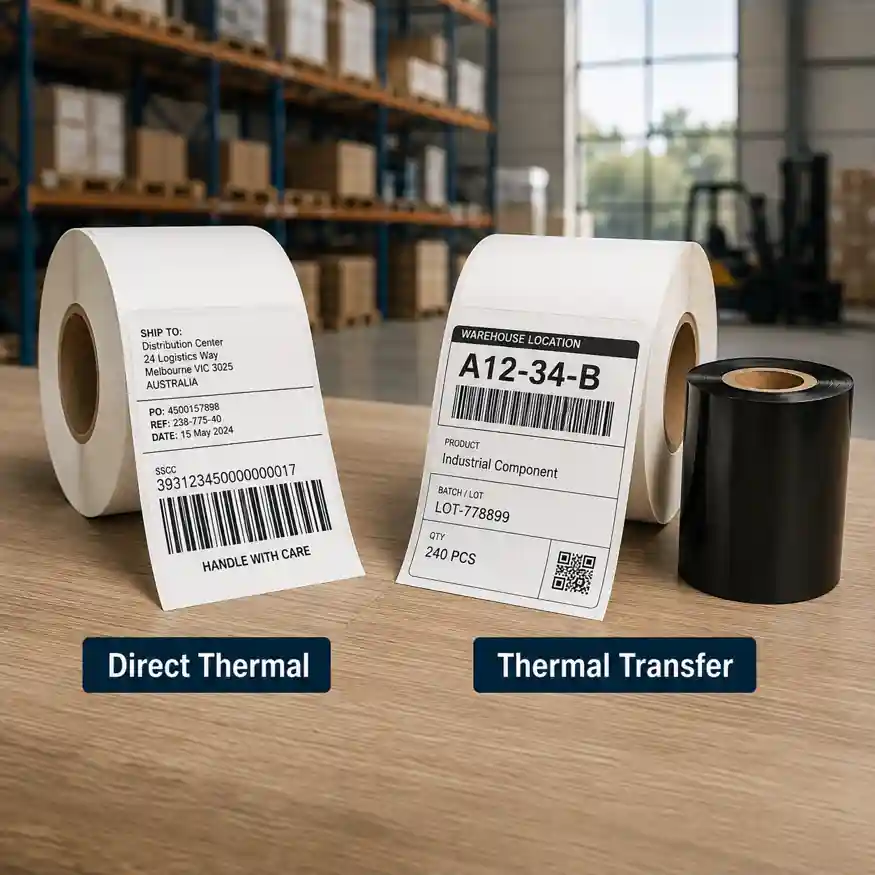
Direct thermal versus thermal transfer label rolls comparison in a warehouse setting.

Quick DT vs TT Decision Guide for Buyers

Application and suggested starting points help establish baseline selection criteria before final validation:

  • Parcel shipping: Direct Thermal — Short life, no ribbon.
  • E-commerce fulfillment: Direct Thermal — High-volume variable printing.
  • Temporary picking labels: Direct Thermal — Limited readable-life requirement.
  • Long-term rack labels: Thermal Transfer — Long image life.
  • Asset identification: Thermal Transfer — Durability.
  • Reusable containers: Thermal Transfer — Repeated handling.
  • Outdoor storage: Thermal Transfer / durable DT — UV and environment must be tested.
  • Cold chain: Depends on construction — Adhesive and facestock matter.
  • Chemical exposure: Usually Thermal Transfer — Wider resistance options.

This guide should be treated as a starting point, not a universal specification. Every application should still be tested using the actual printer, substrate and operating environment.

Quick Technical Difference: What Changes for Procurement?

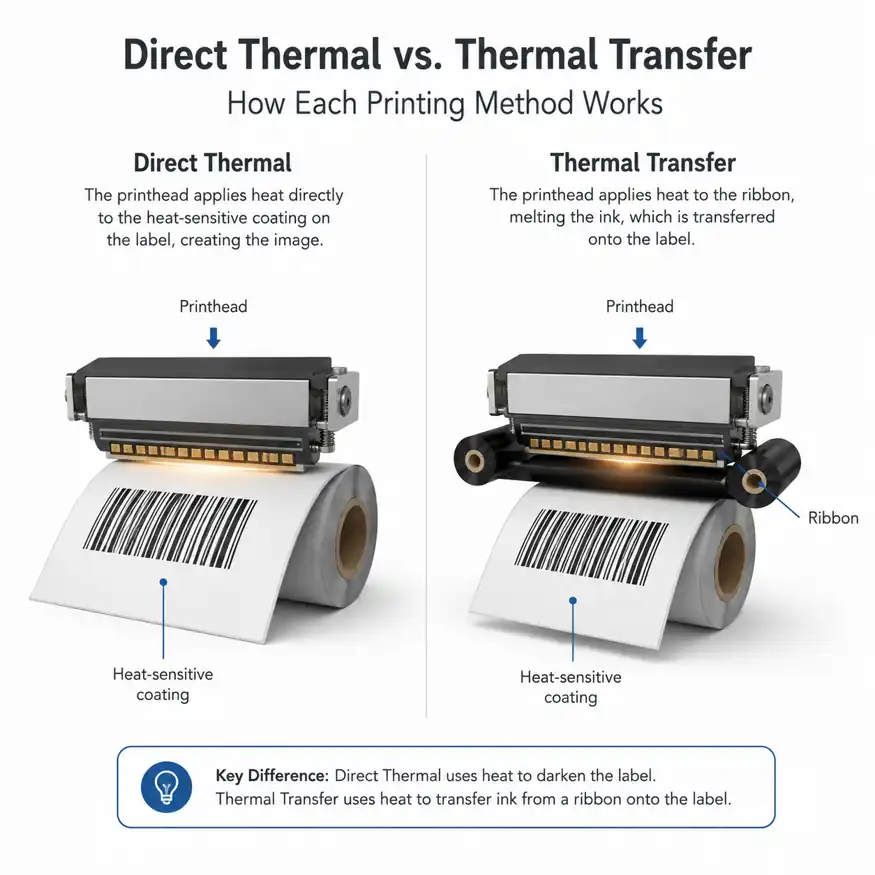
Both technologies use a thermal printhead. The difference is how the image is created. Direct Thermal uses a heat-sensitive coating on the label. Heat from the printhead activates the coating and creates the printed image. No ribbon is required.

Thermal Transfer uses a ribbon. The printhead heats the ribbon and transfers wax, wax/resin or resin material onto the label surface. In simple terms, Direct Thermal uses Label + heat, while Thermal Transfer uses Label + ribbon + heat.

Technical diagram explaining how direct thermal and thermal transfer printing methods work.

This makes Direct Thermal operationally simpler because there is no ribbon to install, stock or replace. Thermal Transfer, however, provides more combinations of label materials and ribbons, allowing higher resistance to scratching, moisture, chemicals and long-term environmental exposure.

Start With the Specification: How Long Must the Barcode Last?

This is one of the most important questions procurement teams should answer before comparing supplier quotations or approving a material. A shipping label may only need to remain readable for several days or weeks, whereas a warehouse location label may need to remain readable for several years.

Direct Thermal is commonly used for parcel shipping labels, e-commerce fulfillment labels, temporary inventory labels, picking labels, and receipts or tickets. Thermal Transfer is commonly used for warehouse rack identification, long-term inventory labels, asset tracking, reusable containers, outdoor identification, and labels exposed to chemicals or repeated abrasion.

Before asking a supplier whether to use DT or TT, ask whether the barcode needs to last 10 days, 10 months or several years. That answer often determines the starting point.

When Direct Thermal Reduces Operational Complexity

For many logistics applications, Direct Thermal should be evaluated first because it removes one consumable from the printing process: the ribbon. This can simplify daily operation in fulfillment centers and shipping departments where large numbers of variable labels are printed.

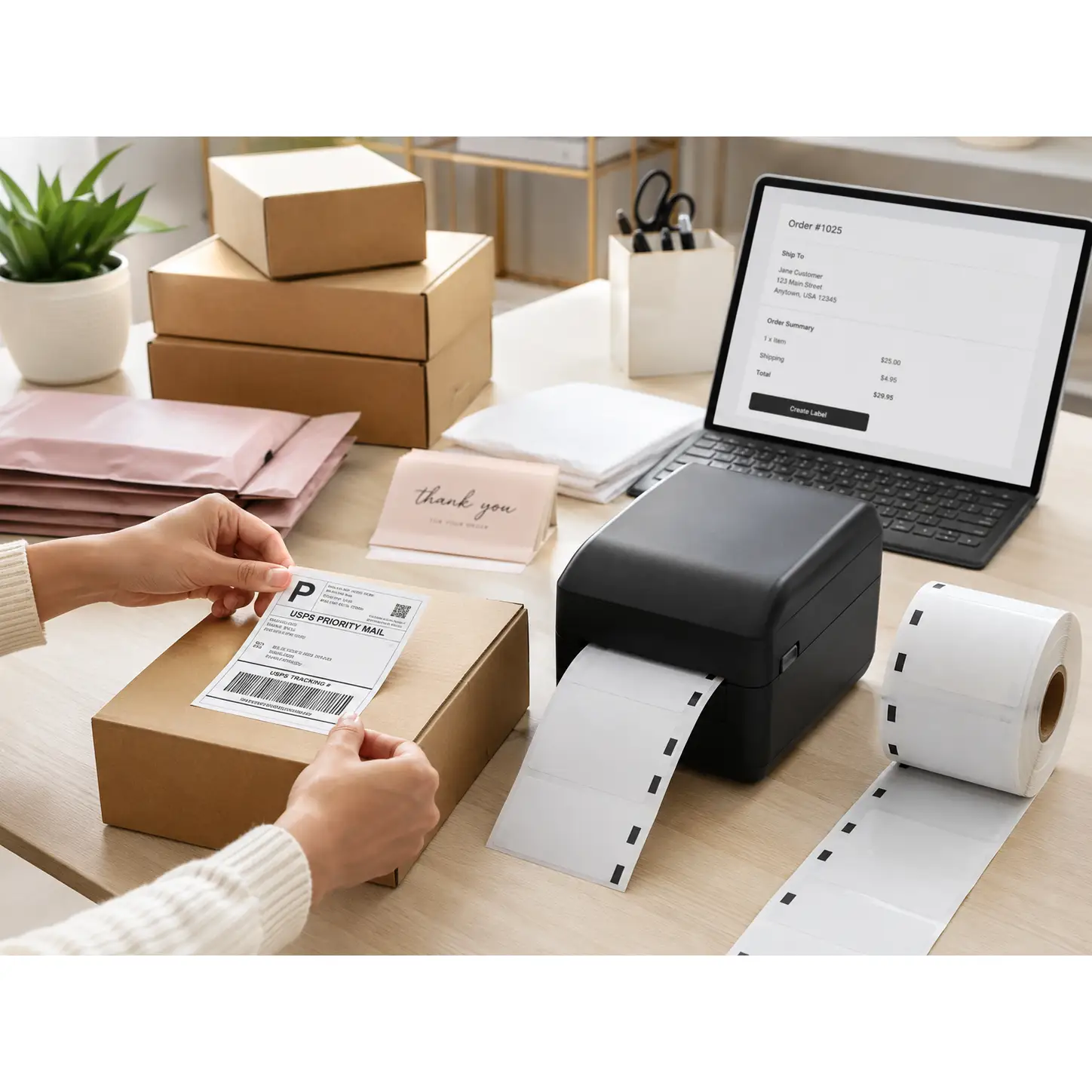
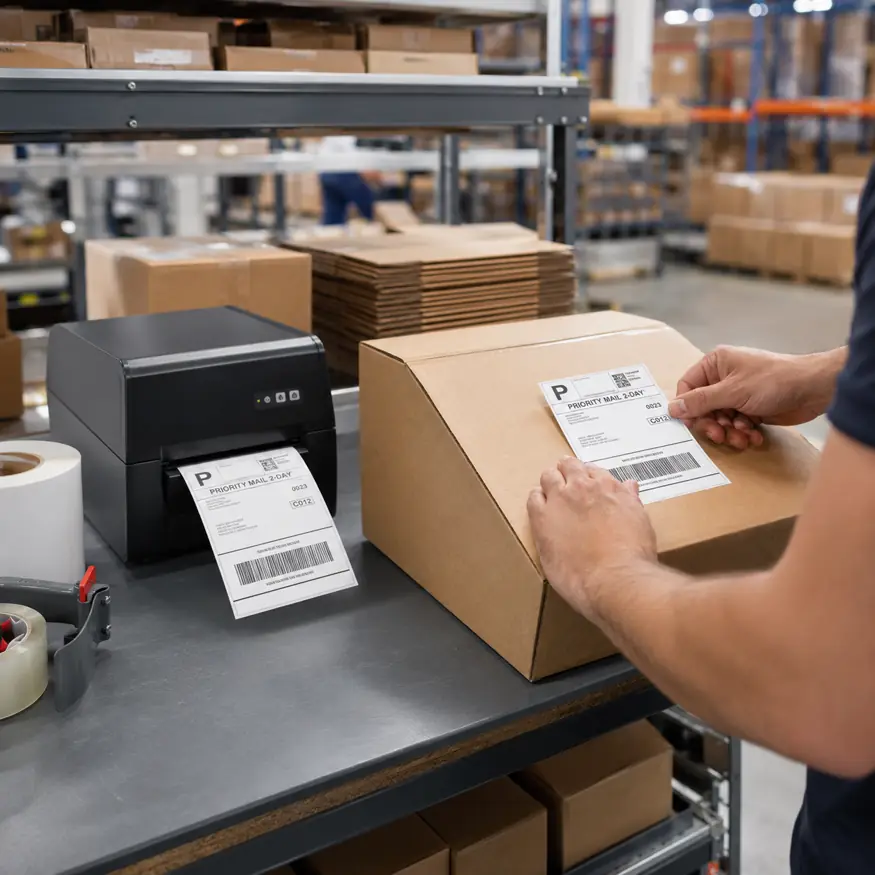
Warehouse operator applying a barcode shipping label onto a corrugated carton box.

There is no ribbon change, no ribbon inventory and no need to match ribbon length with the label roll. Direct Thermal is therefore particularly attractive for high-volume shipping, short label life and indoor use. A typical 4×6 shipping label is a good example of this operational efficiency.

When Thermal Transfer Justifies the Added Consumable Complexity

Thermal Transfer becomes more attractive when the printed information itself must survive demanding conditions, such as long-term storage, frequent handling, abrasion, oil or chemical exposure, UV exposure, and outdoor use.

The key advantage is the ability to combine different facestocks with different ribbon chemistries:

  • Wax ribbon: Often used with paper where moderate durability is sufficient.
  • Wax/Resin ribbon: Provides stronger resistance to scratching and smudging.
  • Resin ribbon: Provides substantially greater resistance when used with suitable synthetic materials.

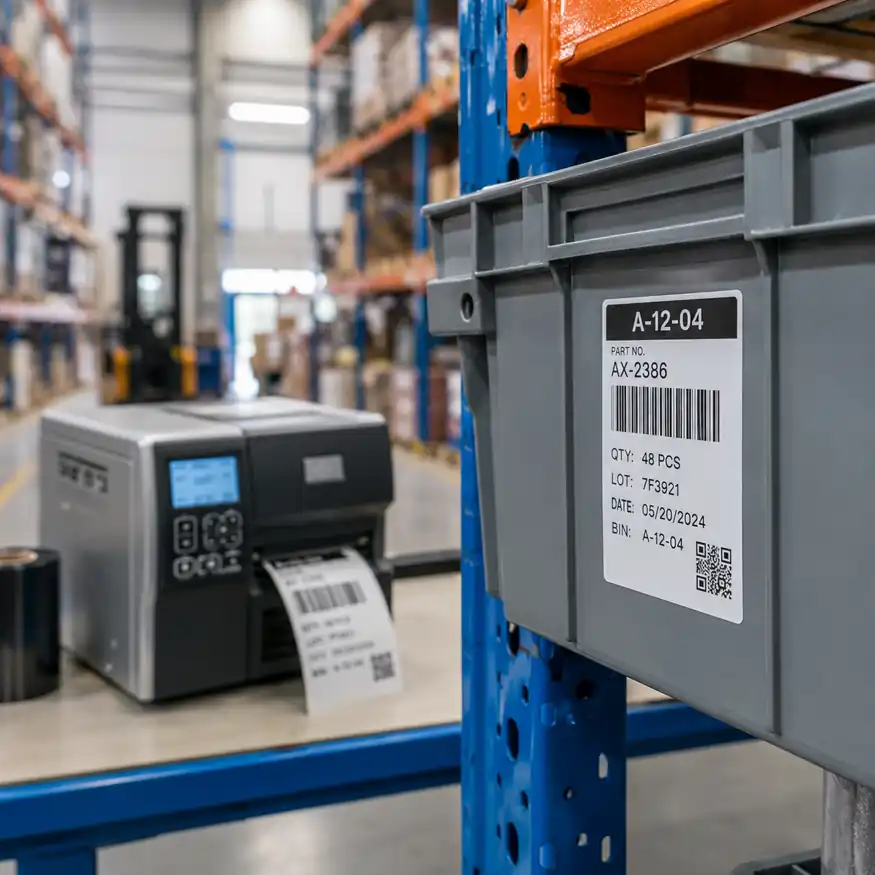
Industrial barcode printer and bin label applied on a warehouse storage rack.

What Buyers Should Compare Beyond DT vs TT

Direct Thermal is often described online as cheap paper for temporary labels, but that description is incomplete. Modern Direct Thermal materials include uncoated paper, top-coated paper, specialty papers, and synthetic Direct Thermal materials. Top-coated materials can provide additional protection against moisture, abrasion and light chemical exposure.

Performance depends on the complete label construction: print technology, facestock, coating, adhesive, and environment. Two products described simply as Direct Thermal labels can use different components and perform very differently.

Do Not Choose Based on International Shipping Alone

A common assumption is that domestic shipping uses DT while international shipping uses TT, but that is too simplistic. Consider a label that travels internationally but reaches the customer within five days and remains indoors, versus a label that never leaves the country but stays on a warehouse rack for five years.

The relevant questions focus on transit duration, sunlight exposure, moisture, physical friction, and chemical contact rather than geography alone.

Cold Chain: DT vs TT Is Only Part of the Decision

Cold-chain buyers often focus immediately on print technology, but a label can have a perfectly readable barcode and still fail if it falls off the package. In refrigerated and frozen logistics, buyers should also specify application temperature, service temperature, surface material, condensation exposure, and required label life.

Both Direct Thermal and Thermal Transfer constructions can be designed for cold environments. Cold chain selection translates into specifying complete application conditions rather than defaulting automatically to Thermal Transfer.

Compare Total Operating Cost, Not Just Price per Roll

Another purchasing mistake is comparing only the price per roll. The actual cost of a labeling system includes label cost, ribbon cost, operator time, ribbon changes, printer downtime, printhead wear, reprints, and failed barcode scans.

Direct Thermal removes ribbon cost and ribbon-change time. Thermal Transfer introduces ribbon cost but may provide stronger durability and reduce direct wear on the printhead because the ribbon separates the printhead from the label surface.

What Procurement Teams Should Include in an RFQ

Before requesting or comparing quotations, provide specific details to ensure suppliers quote against identical application requirements:

  • Printer parameters: Printer model and resolution (such as 203 or 300 dpi).
  • Physical specs: Label size and application surface.
  • Environmental conditions: Required barcode life, indoor or outdoor use, temperature range, and exposure elements.
  • Volume and workflow: Approximate printing volume and current ribbon usage.

Frequently Asked Questions

Is Direct Thermal suitable for shipping labels?

Yes. It is widely used for parcel and e-commerce shipping labels where the required image life is relatively short.

Does Thermal Transfer always last longer?

Thermal Transfer generally offers more long-term durability options, but coated and specialty Direct Thermal materials can perform well in more demanding environments than basic Direct Thermal paper.

Which is better for warehouse labels?

Temporary picking and shipping labels often suit Direct Thermal, whereas long-term rack, asset and location labels more often favor Thermal Transfer.

Does Direct Thermal require ribbon?

No. Direct Thermal uses heat-sensitive media and does not require ink, toner or ribbon.


Comparing Thermal Label Samples or Investigating Batch Inconsistency?

Share your printer model, label size, required barcode life, environment and approximate volume to build a clearer RFQ and sample specification.

How to Choose the Right Thermal Label Sensor.

Selecting the proper thermal label sensor is essential for maintaining precise print registration and avoiding costly paper jams. This comprehensive guide details how transmissive gap sensors, reflective black mark sensors, and physical notch mechanisms interact with various facestocks, liners, and adhesives.

HY Paper DYMO compatible thermal label for barcode and address printing

How Thermal Label Sensing Prevents Continuous Feed and Alignment Errors

Thermal printers need to rely on accurate optical or mechanical detection tools, so that the machine can determine where one cut label ends and the next label begins. If the printer lacks accurate label detection functions, the printhead cannot calculate the top starting edge correctly, which causes printed images to shift position during high-speed runs. If this positional error keeps accumulating, it creates severe alignment issues, leaving barcode graphics cut directly in half, or printing text straight onto the backing paper.

As the media moves through the feed mechanism, transmissive and reflective sensors read changes in light transmission or surface reflectivity. Once light passes through the gap between labels, or bounces back from a high-contrast black mark on the backing paper, a small controller inside the printer receives a sudden voltage signal. This signal immediately recalibrates the stepper motor, locking the starting point of each print pass to the exact beginning position of the label media. Prompt sensor feedback not only stops the paper from drifting, but also lightens the mechanical tension on the rubber roller, which reduces paper jams, and prevents expensive printheads from being damaged by glue residue.

Standard Gap Sensing Mechanisms in Roll-Fed Label Printers

Transmissive detection, which people usually call standard gap sensing, mainly relies on a light emitter and receiver installed on the top and bottom sides of the paper path. As the whole label roll moves through the printer, the sensor measures the light difference between the label itself and the semi-transparent glassine backing paper. Because thicker label paper absorbs more light, while single-layer backing paper lets more infrared light pass straight through the cut gap, this rapid change in light intensity causes the sensor’s output voltage to drop. The printer controller receives a signal immediately, knowing that the front edge of a fresh label has reached the print line.

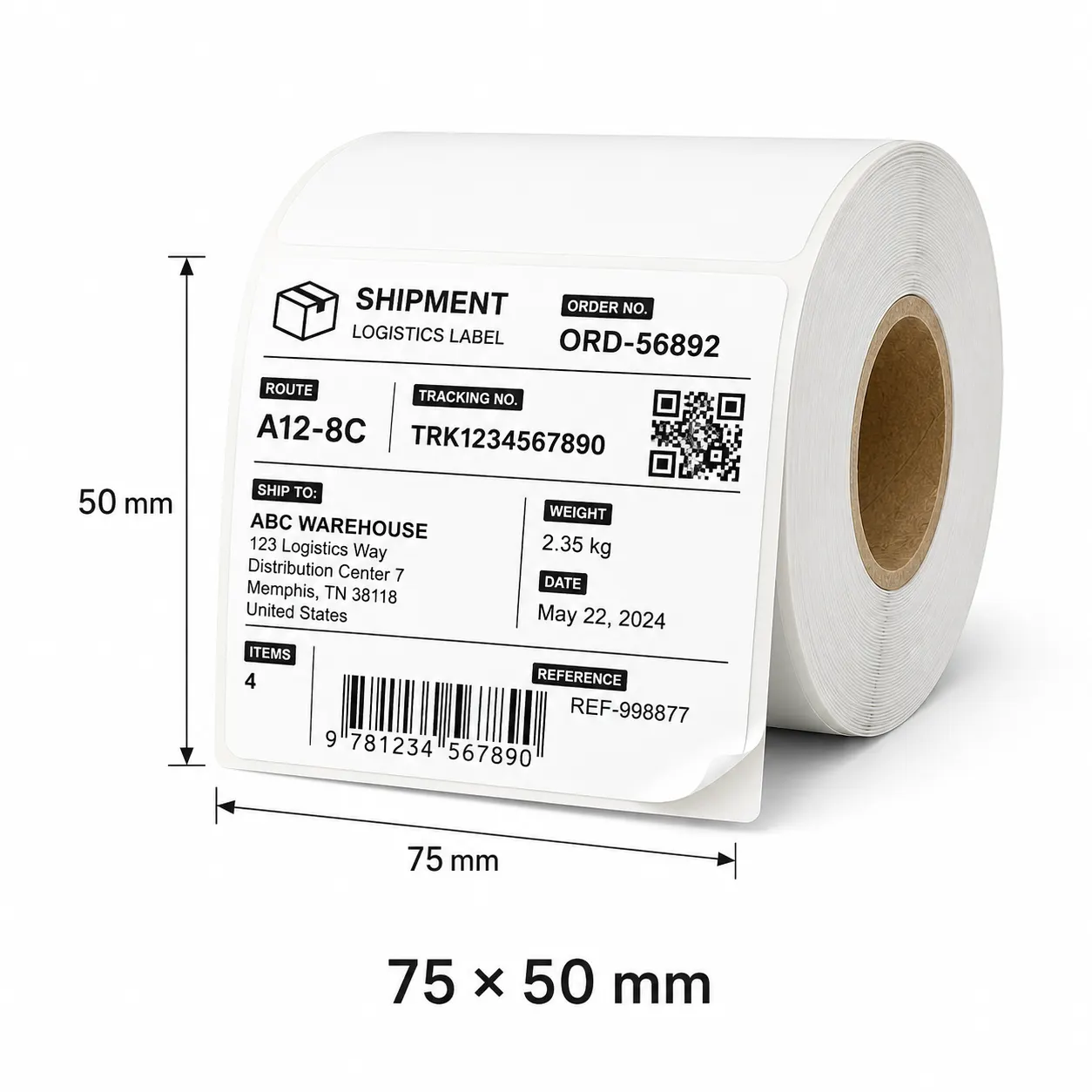
HY Paper 75 x 50 mm thermal label size diagram

If workers want to keep detection results stable, they need to adjust the physical position of the sensor along the paper guide, especially when printing multi-column labels or labels with rounded corners. If the light beam happens to hit pre-printed patterns or irregular liner seams instead of the cut gap, the printer can easily make a wrong judgment. Standard gap sensing works very well for opaque paper and synthetic face materials, but when facing clear plastic labels or heavy backing paper that blocks infrared light completely, its detection capability becomes limited.

Black Mark Sensors for Transparent, Dark, and Die-Cut Substrates

Reflective optical sensors are commonly called black mark sensors, and they measure reflected light instead of transmitted light to solve some limits of transmissive detection. This type of sensor is installed under the paper path, emitting infrared or colored light beams upward toward the back of the backing paper during work. Because clear plastic films, dark synthetic materials, and thicker backing paper often block or scatter light randomly, traditional gap sensing becomes unreliable.

Black mark sensors directly look for high-contrast black bars printed on the back of the backing paper, completely bypassing interference caused by material thickness. Dark carbon-based ink absorbs the light, and compared with the surrounding backing material, the reflected light drops visibly. This obvious change in voltage feedback tells the print driver the exact position of the label edge, no matter if the top face material is totally transparent, metallic, or irregularly shaped.

For black mark detection to succeed, it depends heavily on whether print contrast is strong enough, and whether the black bar shape and size are standard. To absorb light effectively, the black bar must have high optical density, and its width usually needs to reach three to five millimeters within the adjustable sensor range. Also, printing black marks away from background patterns prevents false triggers, ensuring smooth feeding for industrial labels during high-speed printing.

Physical Notches and Hole Punches: When Optical Sensors Fail

When optical light transmission and reflection methods completely fail to work, using physical notches and precision hole punches becomes a reliable hardware solution. Some packaging materials lack the light transmission changes needed for gap sensing, and also lack the dark contrast required for reflection detection, such as clear poly films, thick cardstock, or woven tags. Under these difficult physical conditions, manufacturers punch a clear notch on the edge of the material, or cut a hole directly through the center of the backing paper at each label interval.

As the paper moves forward, a specialized mechanical or transmissive sensor pinpoints these open holes, and when an open gap passes the detection point, it causes a sharp change in light passage or mechanical switch activation. This method of using physical cutouts completely eliminates calibration errors caused by surface graphics, dense hot-stamping foils, or uneven backing paper thickness. The sensor directly ignores surface colors, stray glue, and material transparency, focusing purely on structural cutouts in the material itself.

When using notch detection, workers need to align the sensor assembly and the hole position completely in the physical direction, ensuring the mechanical trigger point matches the starting margin set in the print driver. This structural approach prevents slipping during high-speed printing, ensuring accurate alignment even on complex, heavy industrial materials.

Common Label Alignment Issues and Calibration Solutions

When label alignment problems happen, they usually show up as continuous vertical drift, skipped labels, or printed text crossing over the cut edges during continuous printing. These printing faults usually come from wrong sensor positioning, incorrect driver settings, or dirty material on the optical glass. When the printer fails to detect the top starting point, the internal stepper motor keeps feeding paper, but the printhead does not release ink at the intended position, resulting in cumulative alignment errors.

Paper dust falling from backing paper and residue from evaporating glue often accumulate on the light emitter, which lowers sensor sensitivity and causes it to mistake minor backing paper flaws for real label gaps. If workers want to solve these feeding inaccuracies, they need to combine daily physical cleaning with hardware calibration. Wiping the optical sensor with isopropyl alcohol restores light transmission clarity, allowing the phototransistor to accurately measure small changes in backing paper density or reflective contrast.

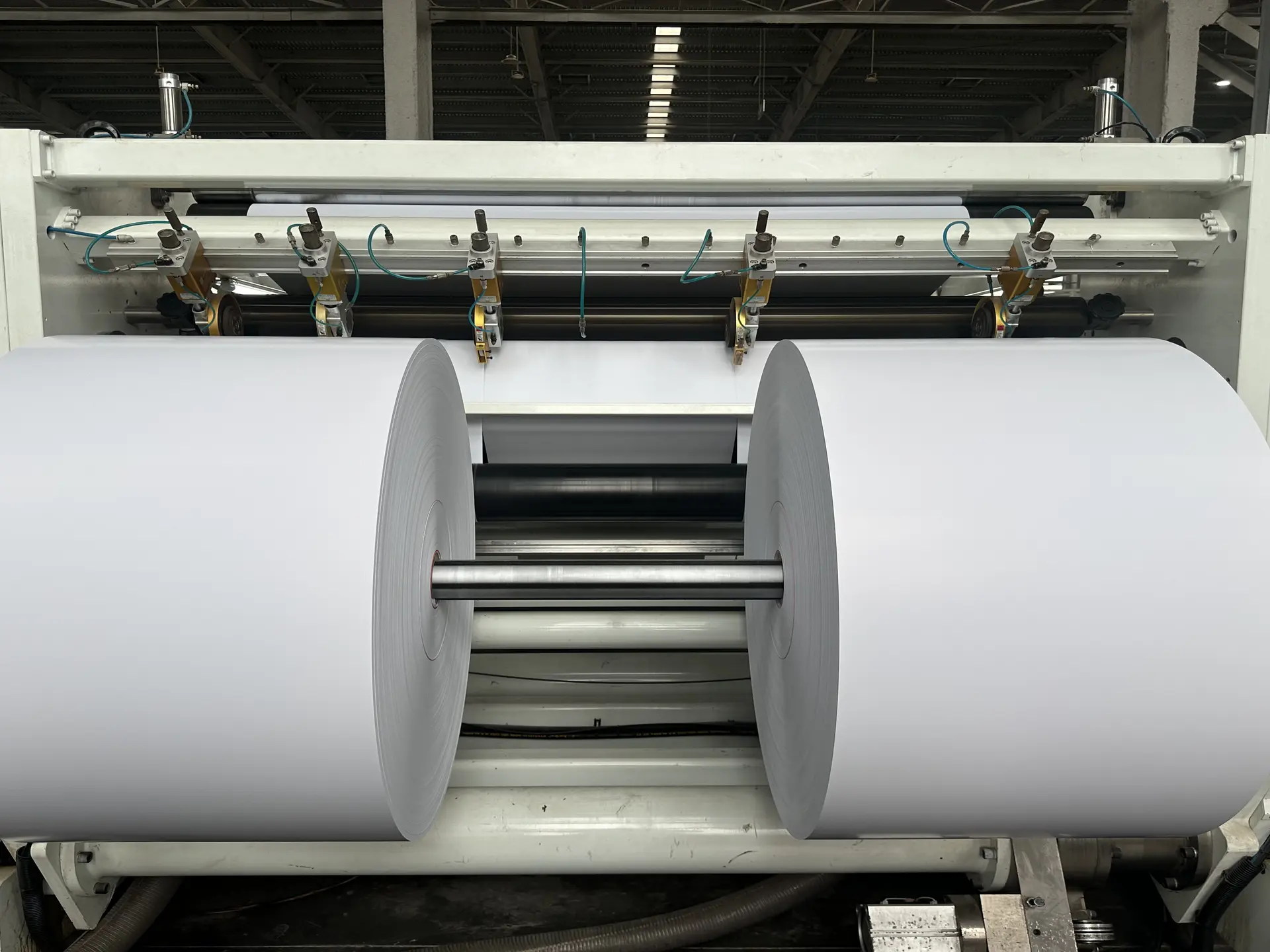
HY Paper slitting and rewinding machine for label materials

Performing a manual calibration forces the printer firmware to measure the baseline voltage of the backing paper and the whole label, resetting the internal trigger threshold to match the current paper roll. At the same time, adjusting paper guides tightly against the roll edge prevents paper from moving left and right, keeping the material locked on the central optical track, so that accurately aligned labels can be printed.

Matching Sensor Types with Liner Material, Adhesives, and Backing Textiles

Selecting a proper detection mode requires matching the physical properties of the label combination with the optical characteristics of the printing hardware. If common paper labels are paired with acrylic adhesive and glassine backing paper, they are very suitable for transmissive gap sensors, because the contrast between single-layer backing paper and double-layer labels creates a clear voltage difference. If synthetic materials like polypropylene or polyethylene are used with strong rubber adhesive or dark backing paper, light struggles to pass through, and choosing reflective black mark detection becomes much safer.

Metallic foils and shiny films create mirror-like reflections that easily blind standard reflective sensors, so workers need to install the sensor at an angle, or switch to an RGB light emitter that separates color spectrum contrast. As for fabric backings, thick cardstock, and continuous self-adhesive materials, they have special physical properties and need specialized sensor setups. Woven care labels and thick paper tags have no fixed light gaps and are hard to print with clear black marks, so physical notch sensing or using software to control feeding distance becomes the main approach.

Continuous feed mode turns off optical gap detection completely, relying purely on motor pulse counts to push fixed lengths of material. As long as packaging workers understand these material interactions, they can choose the right material structure during early design, avoiding wasted time and materials on the factory floor.


Resolve Your Label Sensing & Converting Challenges

Struggling with label skipping, clear film calibration, or black mark positioning? Our technical team provides tailored die-cut options, custom mark printing, and free sample rolls validated for your printer model.