
For distributors and procurement teams buying direct thermal labels in volume, faint or inconsistent printing is more than a printer troubleshooting issue. If an approved sample prints correctly but a later roll or production batch does not, the difference can become a supplier-qualification and batch-acceptance issue.
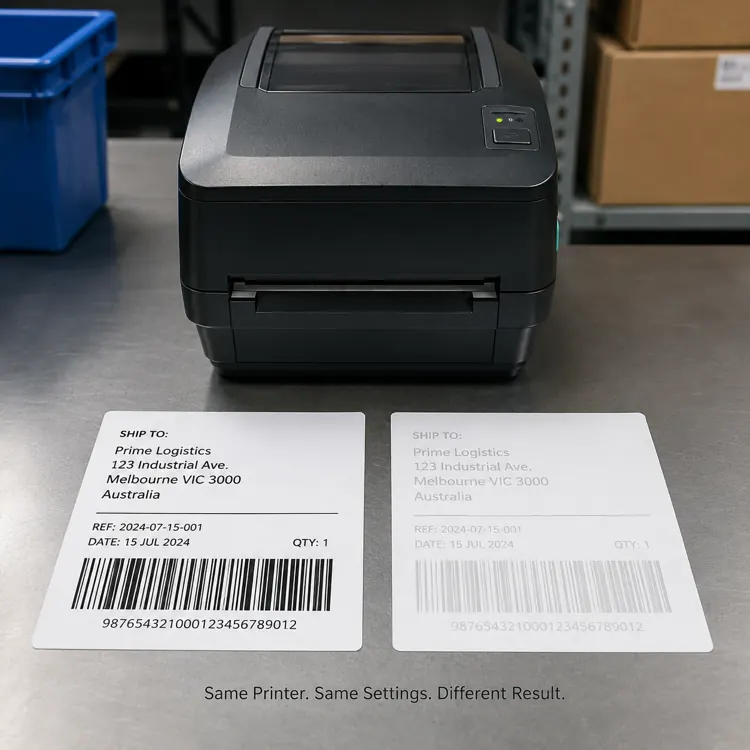
Direct Thermal Print Quality Problems: Material, Batch or Printer?
Direct thermal print quality depends on a combination of thermal coating sensitivity, print speed, printhead condition, printhead pressure and media consistency. The purchasing task is therefore to separate printer-related variables from material and batch-related variables before accepting or rejecting a production lot.
1. Start With a Controlled A/B Test Before Blaming the Printer or Batch
Use a controlled A/B comparison.
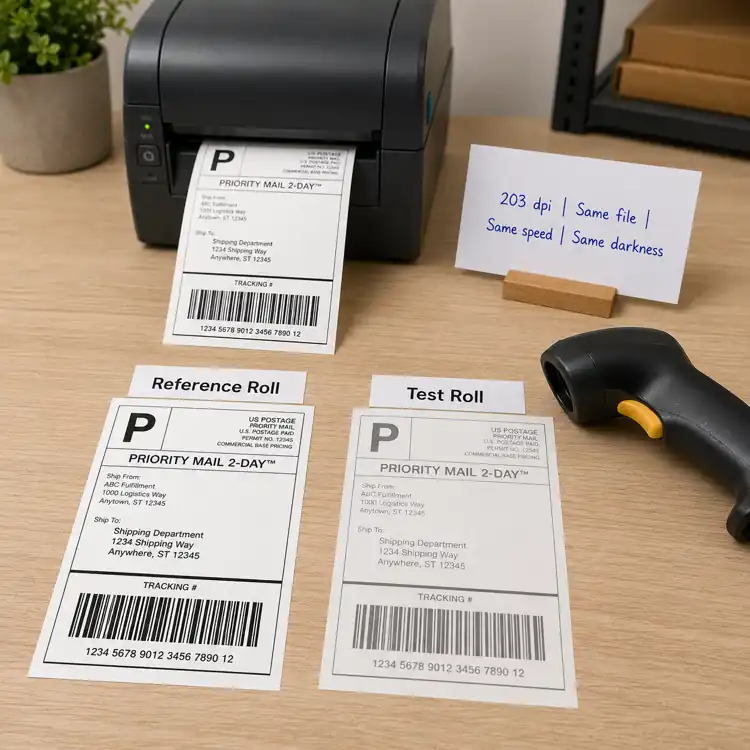
Take the approved label and the new label. Print both using the same printer, speed, darkness, barcode file and operating conditions. Then compare print density and scanning performance.
If the approved material prints normally while the new material remains consistently lighter, media sensitivity or material consistency becomes a much stronger suspect.
If both materials print poorly, investigate the printer, printhead or operating settings first.
2. Thermal Coating Sensitivity: A Material Variable Buyers Should Compare
Direct thermal paper does not contain ink. The image is created when heat from the printhead activates the thermal coating on the label surface. Different materials can therefore require different amounts of energy to reach the same optical density.
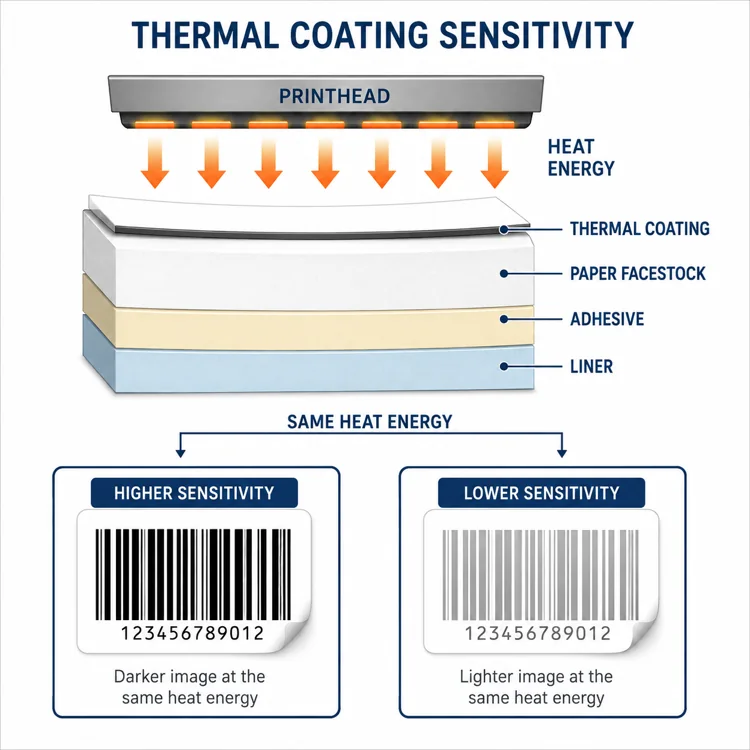
A label with higher thermal sensitivity can generally develop a dark image using less energy or at a higher printing speed. A less sensitive material may appear pale under exactly the same printer settings.
Buyer question: If an approved roll prints dark and a new production roll prints light on the same printer, is the variable really the printer—or the thermal response of the material or batch?
3. Print Speed Can Expose Material Differences
A thermal printhead has only a limited amount of time to transfer heat into the coating. As print speed increases, that contact time decreases.
This explains a common warehouse situation: a label prints perfectly during a slow test run but becomes noticeably lighter when the production line operates at normal speed.
Increasing darkness may compensate for this—but it should not automatically be the first or only solution.
4. Why Increasing Darkness Is Not a Supplier-Quality Test
When operators see pale printing, the natural reaction is to increase print darkness. That can work, but excessive heat can cause barcode bars to spread into the spaces between them.
The barcode may look darker and stronger to the human eye while actually becoming harder for a scanner to interpret correctly.
The objective should be: use the lowest energy level that produces stable contrast and reliable scanning.
5. Use the Defect Pattern to Separate Printer and Material Problems
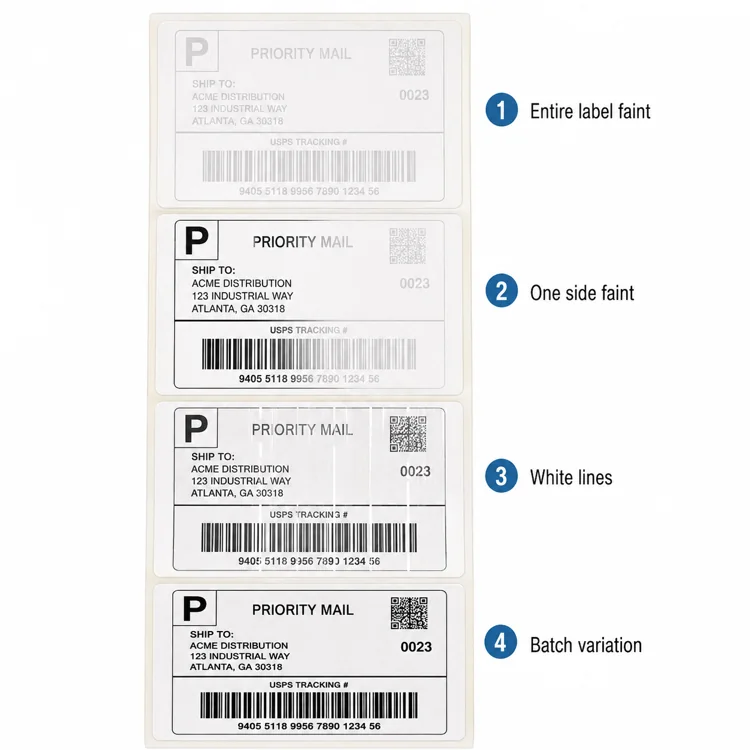
The pattern of the defect can tell you a lot.
- Entire label is light: check media sensitivity, print speed, darkness setting, printhead cleanliness and media compatibility.
- One side is lighter: investigate uneven printhead pressure or media loading rather than assuming a coating issue.
- Narrow lines or areas are missing: check the printhead for contamination or damaged heating elements.
6. Rule Out Printhead Condition Before Rejecting a Batch
Dust, adhesive residue or paper contamination on the printhead can act as an insulating layer between the heating elements and the thermal coating.
Less energy reaches the media, which can produce pale areas, white lines or inconsistent print density.
If cleaning restores the original print density, replacing the labels would not have solved the real problem.
7. Why Sample Approval Is Not Enough for Bulk Orders
A good sample does not automatically guarantee identical production performance.
Small differences in machine settings, pressure, substrate properties, ambient humidity or temperature can change barcode results between print runs. For label buyers, the same principle applies to thermal coating consistency, material thickness, surface characteristics, converting conditions and batch-to-batch variation.
For B2B buyers, supplier evaluation should therefore include repeatability across rolls and production batches—not just one attractive sample.
What Buyers Should Ask Their Thermal Label Supplier
When print performance changes between an approved sample and a production lot, procurement teams should ask whether the same label construction and control conditions were maintained:
- Was the same facestock and thermal coating specification used?
- Did the adhesive, liner, thickness or converting specification change?
- Can the production batch be traced to raw-material and converting records?
- Is an approved reference sample retained for comparison?
- Can print density and barcode scan consistency be checked before shipment?
These questions turn a vague print-quality complaint into a supplier and batch-evaluation process that can be repeated for future orders.
What Procurement Teams Should Record Before Evaluating a Batch
- Printer model and resolution
- Print speed
- Darkness or energy setting
- Label material / batch
- Barcode scan result
Then compare an approved reference roll against the current roll under exactly the same conditions.
B2B Procurement Takeaway
A lighter print result is not automatically proof of a defective label batch. It can result from the interaction between printer energy × print speed × thermal coating sensitivity × printhead pressure × printhead condition × material consistency.
For procurement teams, the better question is: “Under the same controlled conditions, does the current production batch deliver the same print density and scan performance as the approved reference material?”
Comparing thermal label samples or investigating batch inconsistency? Share the printer model, current label specification, operating settings and print result so the material can be evaluated under controlled conditions before bulk approval.
Frequently Asked Questions
Why is my thermal label printing light even at high darkness?
The thermal coating may require more energy, print speed may be too high, or the printhead may be dirty, worn or applying uneven pressure.
Can thermal label quality affect barcode scanning?
Yes. Poor contrast and inconsistent printing can reduce barcode readability.
Should I always increase darkness when thermal printing is faint?
No. First check speed, media compatibility, printhead condition and material consistency.
How can I compare two thermal label materials correctly?
Print both on the same printer using identical speed, darkness and barcode data, then compare print density, barcode scanning and repeatability.
Comparing Thermal Label Samples or Investigating Batch Inconsistency?
Share your printer model, current label specification, operating settings and print result so the material can be evaluated under controlled conditions before bulk approval.